The Internet has enabled businesses to establish relationships on a global scale. Now, an upscale restaurant in Minneapolis can use the Internet to order ingredients from a vendor in Bordeaux. However, there can easily be a language difference when doing business internationally. This is when it is fortunate that Windows 10 makes it so easy to change your device’s language.
The first thing you should do is right-click on the taskbar and select Show touch keyboard button on the menu that appears.
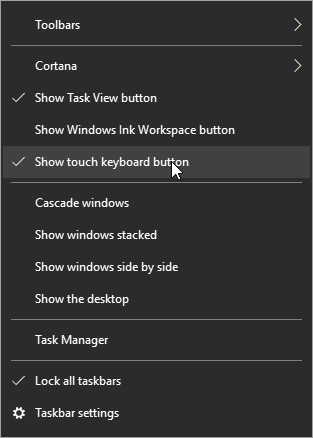
An icon resembling a keyboard will now display in your taskbar next to your clock and calendar.

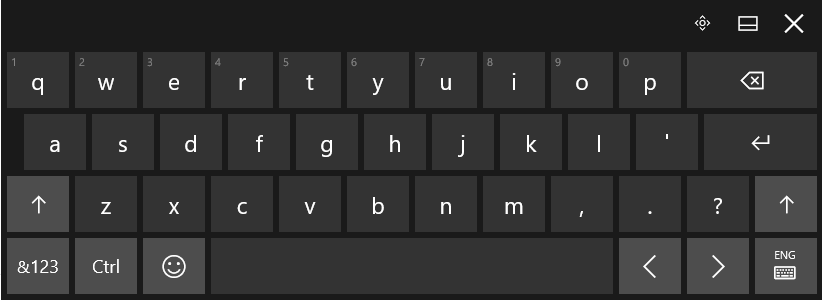
Clicking this icon will bring up a touch-enabled keyboard. If your device doesn’t have touch capabilities, you can also select keys with your mouse.
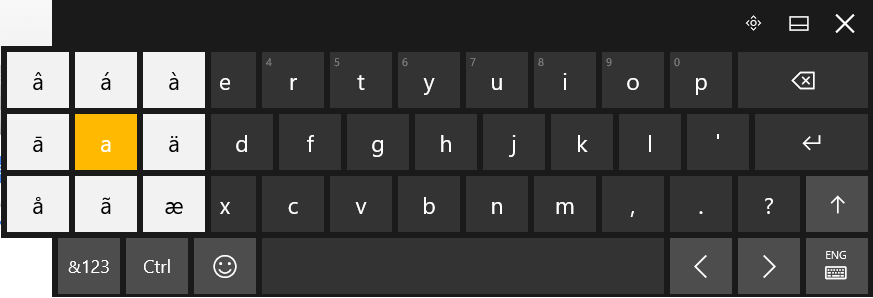
To insert a letter with an accent mark, click and hold the base letter until the available options appear. Click the option you need to insert, and voila!
However, if you need to write in a different language regularly enough that the above option isn’t convenient, you can change the layout of your keyboard to suit your needs. Returning to the bottom-right corner of your screen, you can find your chosen language next to the touch keyboard icon.
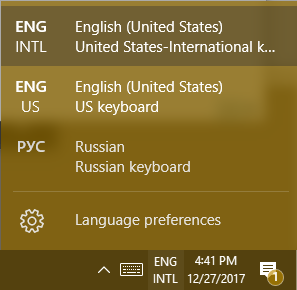
Changing this language will also alter how your physical keyboard works. If the language you need to use doesn’t appear in the list of available languages, you can edit this list (and possibly add the language you need) in the Language preferences menu item.
For Other Versions of Windows, Use ALT Codes
If you’re still using an older version of the Windows OS, like Windows 7, 8.1, or even Vista or XP (which we don’t recommend), you can use ALT Codes to insert symbols or letters augmented with assorted accent marks. Each option of symbol or augmented letter has a numeric code assigned to it that allows you to insert that symbol or letter by holding the ALT key and typing the code into your numeric keypad. You can find a good resource here.
Are there any tricks you have for communicating in another language on your computer? Share them below! Partagez-les ci-dessous! Ossza meg őket lent! Compartilhe-os abaixo!



Comments